← SELECTED WORKYUG / PRODUCT CASE STUDY 01
AI RESUME PLATFORM / V3

ArkCV.Builder

A score needs
a next step.

Getting a resume score is easy; knowing how to fix it is not. ArkCV highlights specific resume issues and gives job seekers clear ways to improve their content step by step.

PROJECT TYPE
AI resume platform · Web
MY ROLE
UX Analyst · User flows, page structure & usability reviews
TEAM / 3 PEOPLE
Product Manager, Developer / AI Engineer, UX Analyst
TIMELINE
April—July 2026
THE WORKING PRODUCT / VERSION 3
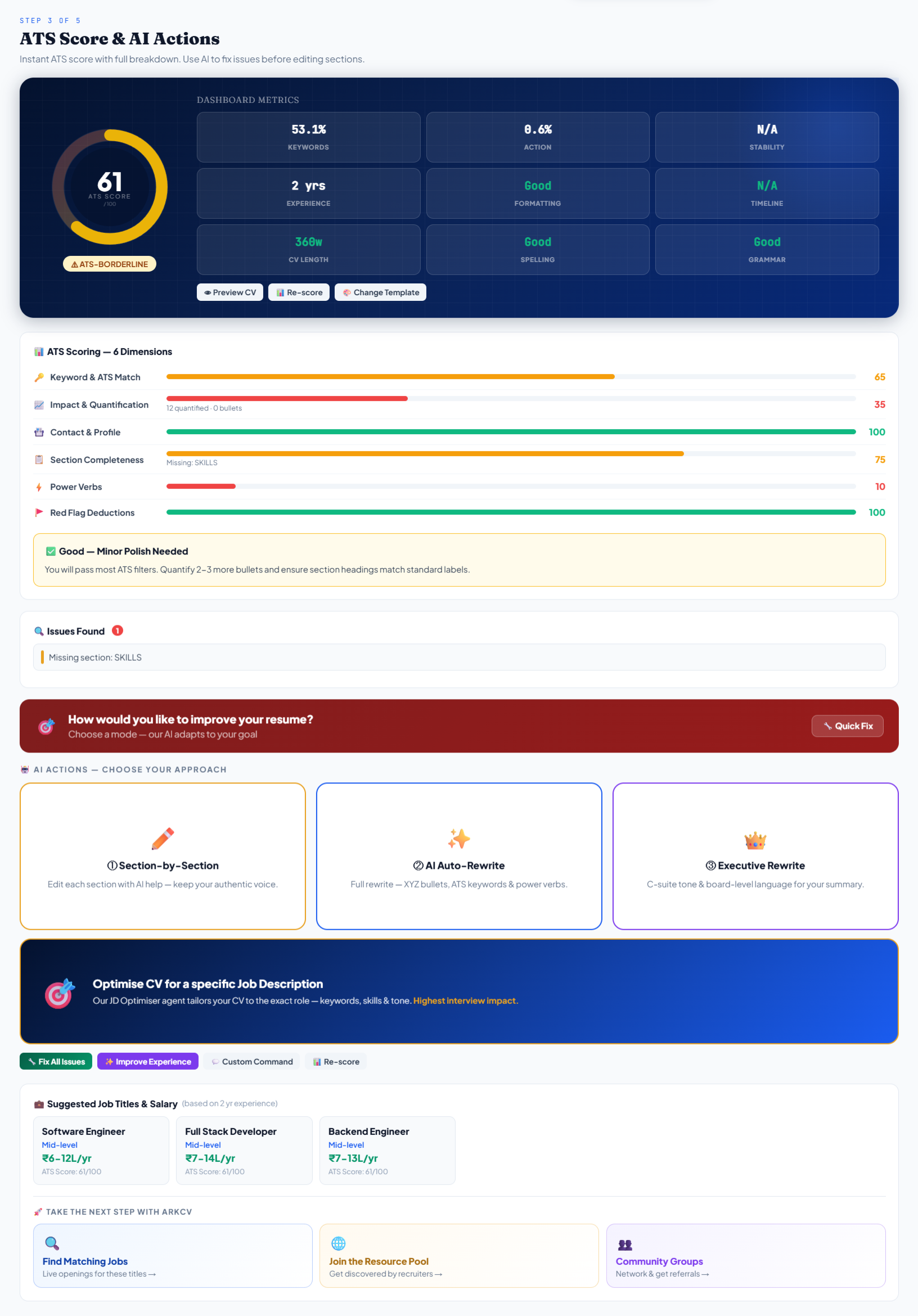
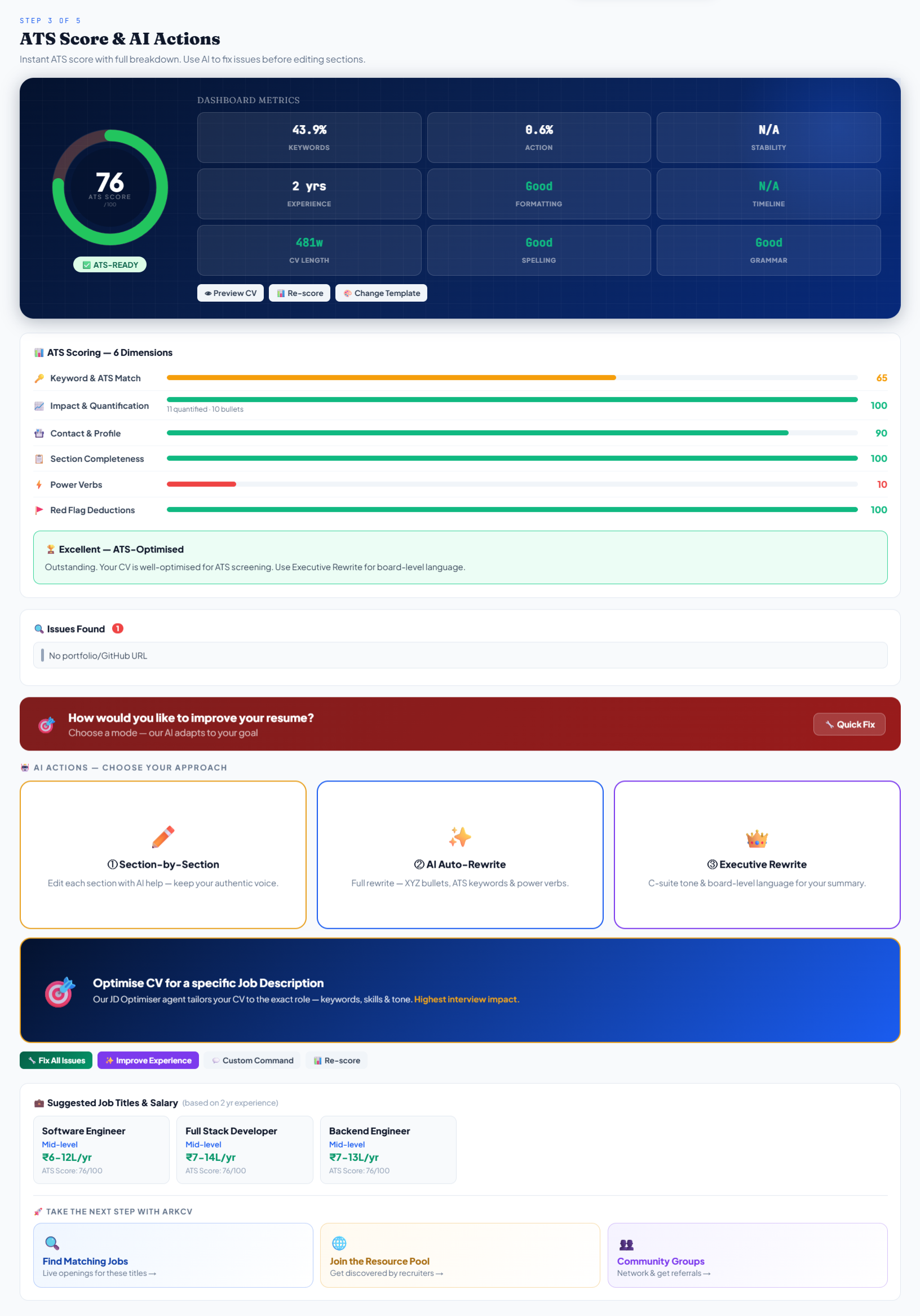
Version 3 resume score and six resume checks
Version 3 · Score breakdown and six resume checks
Swipe to explore · tap to open the full screen ↗
01 / THE PROBLEM

A score without answers.

Job seekers often get low resume scores without understanding why. They need clear feedback that tells them what to fix.

THE PROBLEM

A score alone doesn't explain the penalty.

Many resume scanners show a single number without explaining where points were lost. Candidates are left guessing whether to rewrite bullet points, tweak formatting, or rearrange sections.

THE GOAL

Clear feedback with candidate control.

Our goal was to explain resume issues in plain English and let candidates stay in control of how they edit their content.

02 / MY ROLE & APPROACH

Small team, rapid iteration.

ArkCV was built by a three-person team in collaborative sprints. As UX Analyst, I designed the user flows, page layouts, interactive prototypes, and reviewed working builds.

PRODUCT MANAGEMENT

Product Manager

Defined product scope, monetization models, and tier structures (Free, Pro, Elite).

ENGINEERING

Developer / AI Engineer

Built the web application, resume parser, AI integrations, and database architecture.

UX & USABILITY

UX Analyst (My Contribution)

I mapped user journeys, structured editor layouts, built prototypes, and reviewed working screens with the team to fix confusing steps and awkward layouts.

MY VERIFIED CONTRIBUTIONS (I)
  • Mapped how job seekers move through three starting paths into the core 5-step builder.
  • Structured the page layout, field order, and section grouping across the multi-step editor.
  • Designed the side-by-side comparison screens for the three AI editing choices.
  • Built interactive prototypes to test layout balance and pacing directly in the browser.
  • Reviewed working browser builds to fix confusing button labels and clunky transitions.
COLLABORATIVE TEAM WORK (WE)
  • Audited existing resume builders together to find common user frustrations with scoring and forms.
  • Decided as a team to offer three levels of AI help, balancing speed with user control.
  • The engineer built document parsing, AI prompts, and database infrastructure.
  • Walked through working builds together to improve button placement and step-by-step clarity.
DESIGN & DEVELOPMENT APPROACH

From problem exploration to shipped product.

We tested working screens directly in the browser and refined interactions through team reviews across four stages.

STAGE 01EXPLORE
Understand the friction

Audited competing resume tools and noted common pain points: unclear scores, rigid forms, and lack of user control.

STAGE 02PROTOTYPE
Map flows & layouts

Prototyped intake options and editor layouts to make moving from the score to editing clear and easy.

STAGE 03MID-MAY 2026
Build & review

Reviewed working browser builds with the team and peers to spot confusing buttons, navigation issues, and awkward layout shifts.

STAGE 04SHIPPED V3
Consolidate & ship

Brought the six diagnostic checks, three AI editing options, and pre-download review into the Version 3 release.

Prototyping tools

Used Google AI Studio, Lovable, and Figma Make for rapid interactive prototyping in the browser. Team walkthroughs guided improvements before final implementation.

PROJECT TIMELINE · 4 MONTHS

Four months from problem research to Version 3.

Four months of focused design and prototyping, moving from initial problem research to a working builder with clear AI guidance.

Project Timeline · April—July 20264 Months · UX Analyst & 3-Person Team
Workstream / Focus
AprilFriction & Journey Mapping
MayPrototypes & Mid-May Test
June3-Tier AI UX & Usability
JulyRefinements & V3 Release

Understanding Resume-Building Problems

Audited existing builders and candidate drop-offs; identified opaque scoring and rigid forms; mapped candidate journeys across 3 entry paths.

UX Analyst & Team
Friction audit · 3 candidate journeys

User Flows & Information Architecture

Structured 5-step core builder flow, section navigation, and form hierarchy (Contact, Experience, Skills, Education, Projects).

UX Analyst (My Contribution)
5-step flow · Form hierarchy · Section grouping

Wireframes & Interactive Prototypes

Built interactive prototypes to evaluate layout balance, screen pacing, and interaction flow directly in the browser.

UX Analyst (My Contribution)
Interactive prototyping · Interaction reviews

Resume Diagnostics & AI Assistance UX

Designed interface for six diagnostic checks and structured side-by-side comparison for Section-by-Section, AI Auto-Rewrite, and Executive Rewrite.

UX Analyst & Engineering
6 diagnostic checks · 3-tier AI layout

Interface Reviews & Version 3 Delivery

Tested working browser builds through team walkthroughs and peer reviews following mid-May test launch; refined interaction clarity and action hierarchy, then shipped Version 3.

UX Analyst & Team
Team walkthroughs · Interface refinement · V3 release
Monthly Milestones
APRIL · M1Problems mapped & journeys defined
MAY · M2Mid-May test launch & prototypes
JUNE · M33-tier AI comparison layout reviewed
JULY · M4Version 3 shipped with 6 diagnostics
APRIL 2026UX Analyst & Team

Problem Discovery & Journey Mapping

Problem AuditUser JourneysIA Setup

Audited competing resume tools to identify common user frustrations: opaque scoring, rigid forms, and lack of candidate control. Mapped candidate user journeys across three distinct starting points (Template-first, Upload CV, Scratch) converging into the core editor.
MAY 2026UX Analyst Contribution

Prototyping & Mid-May Test Launch

Interactive PrototypesEditor WireframesAI Flows

Built interactive prototypes to evaluate layout balance, screen pacing, and interaction flow in the browser. Conducted an initial test launch around mid-May 2026 to review navigation and intake flows with peers.

JUNE 2026UX Analyst & Team

AI Assistance UX & Team Reviews

3-Tier AI LayoutDiagnostic UIPeer Reviews

Structured the side-by-side preview layout for Section-by-Section, AI Auto-Rewrite, and Executive Rewrite. Tested working browser builds repeatedly within the team and with peers to uncover ambiguous buttons and awkward transitions.

JULY 2026UX Analyst & Team Engineering

Interface Refinement & Version 3 Release

Interface RefinementsReview SafeguardsV3 Release

Refined interaction clarity, button hierarchy, and in-editor review steps. Unified the six diagnostic checks and three AI editing tiers into the final Version 3 release.

03 / UNDERSTANDING THE USER FLOW

Three starting points, one clear journey.

Instead of forcing everyone through one rigid sequence, we designed three starting points that lead into a straightforward five-step builder.

PRIMARY USER-FLOW ARCHITECTURE

How candidates move through ArkCV

Three starting options lead into a five-step builder, supported by practical job search tools.

PHASE 01 · ENTRY3 Starting Points

Three User Intentions

Route 01 · Choose a Template
Template-first flow for candidates who want to pick a layout first.
Route 02 · Upload Existing CV
Upload a PDF or paste text to parse existing content directly into editable fields.
Route 03 · Target a Specific Role
Compare an existing resume with a job description to highlight missing skills and keywords.
PHASE 02 · CORE JOURNEY5-Step Builder

The Converging Flow

01
Choose Layout
Select a template with format, photo, and font options.
02
Add Resume Data
Upload a PDF or paste plain text to fill in fields automatically.
03
Check Diagnostic Score
Six clear diagnostic checks pinpoint specific areas needing work.
04
Guided Improvement
Choose Section-by-Section guidance, full AI Auto-Rewrite, or manual editing.
05
Review & Save
Review layout and content before exporting a clean PDF.
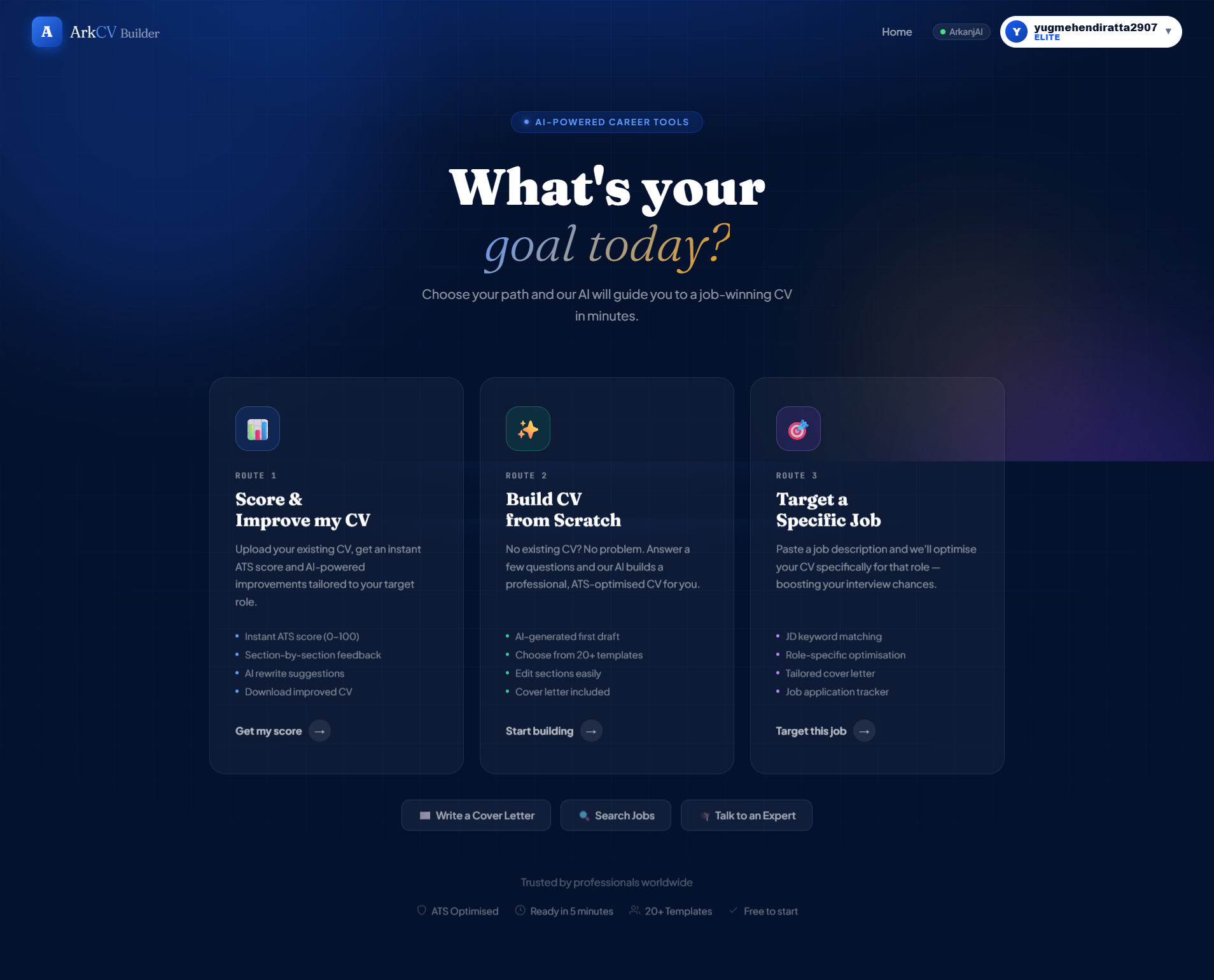
Three ways to begin
Three ways to begin
CHOOSE YOUR STARTING POINT
Dashboard overview
Dashboard overview
VERSION 3 · AI ASSISTANCE MODULESScreen from the working product
Version 3 screen showing six AI assistance modules and diagnostic checks
Version 3 · AI assistance modules and diagnostic checks
CONNECTED CAREER TOOLS

Supporting Job Search Tools

The platform connects the core resume builder with practical tools for cover letters, interview prep, and online profiles.

Cover Letters

Generate a tailored cover letter matched to a target role.

Job Search

Find job listings matched to your skills and experience.

Interview Prep

Practice role-specific interview questions and answers.

LinkedIn Help

Improve your headline, summary, and work history for better clarity.

Public Profile

Share a web profile link directly with recruiters.

View complete platform architecture (6 categories)

Complete architectural map of Version 3 modules, pages, and entry logic based on the shipped product.

Platform map

Complete 6-Category Platform Architecture

A technical breakdown of all six core modules in Version 3.

Resume Builder EngineCore Platform
Core generation and editing pipeline
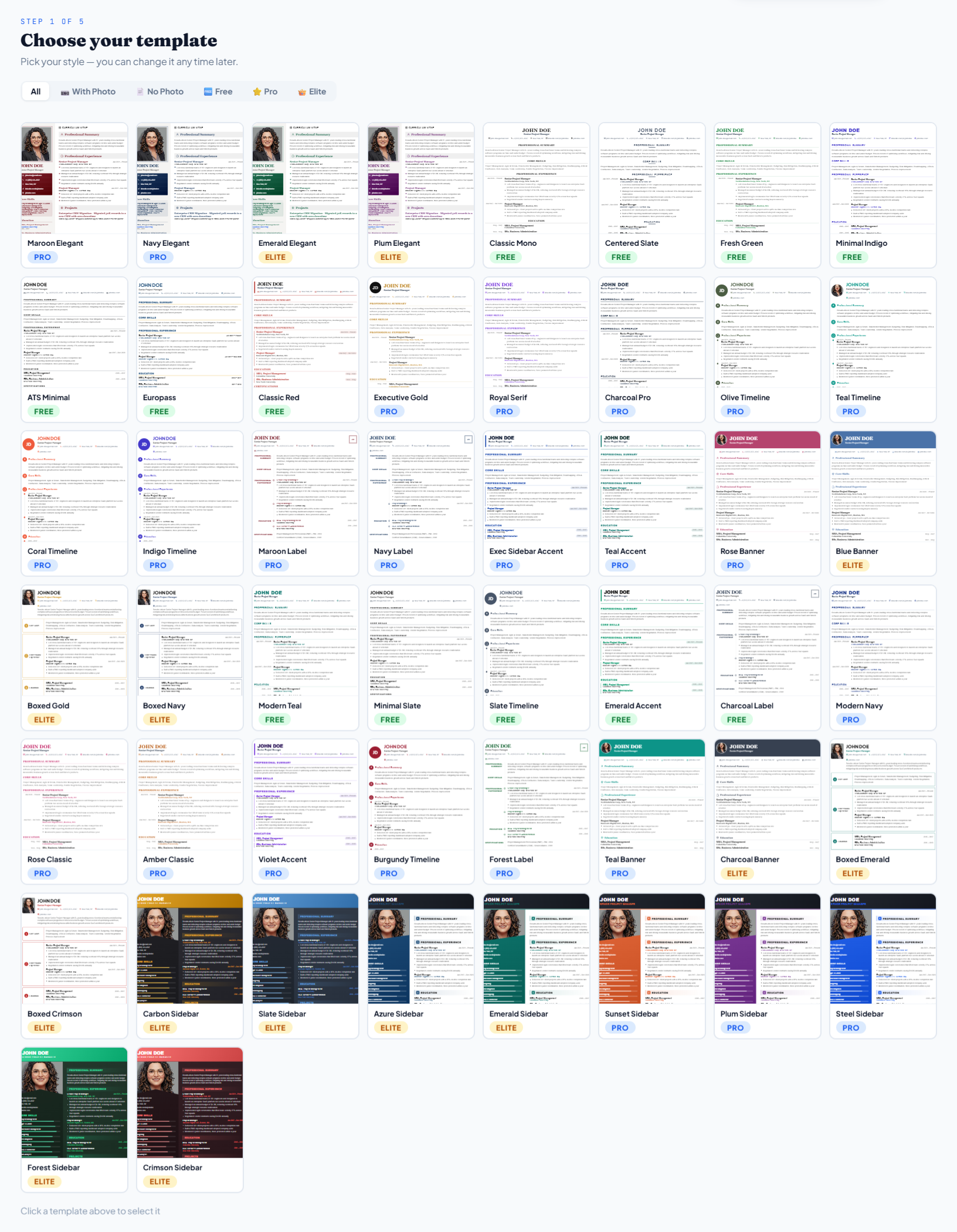
Template Gallery & Styles
Browse layout options with photo and typography filters
Dual Intake & Document Parser
Extracts plain text or uploaded PDFs into structured data
6-Check Diagnostic Engine
Evaluates keywords, impact metrics, contact details, structure, power verbs, and formatting
AI & Manual Section Editor
Section-by-section guidance, auto-rewrites, and manual field editing
Compile & Export Module
In-editor preview safeguard, PDF generation, and profile save
Career DiscoveryShown in version 3
Role discovery and compensation benchmarks
Matching Job Search
Filter job openings matched to parsed skills
Titles & Compensation
Market salary ranges and suggested job titles
Recruiter Network
Profile visibility option for inbound recruiter outreach
Interview PreparationShown in version 3
Simulated interviews and role-specific question bank
AI Interview Practice
Interactive interview simulation for target roles
Role-Specific Questions
Curated questions targeting technical skills and experience
Profile BuildingShown in version 3
Professional online presence and networking
LinkedIn Profile Review
AI assistance for headlines, summaries, and experience
Public Web Portfolio
Shareable web profile generated directly from resume data
Application toolsShown in version 3
Targeted application collateral
AI Cover Letter Generator
Tailored cover letters aligned with company requirements
Job Description Matcher
Keyword and skill comparison against target job descriptions
Resources & SupportShown in version 3
Career advice and account help
1-on-1 Career Expert Review
Personal advice on portfolios and interviews
Platform Help & Support
Help with billing, templates, and accounts
* Documented from the shipped Version 3 codebase and interface walkthroughs.
Converging User Flow

Three Starting Points → One Resume Builder

How candidates enter the builder with different intentions and merge into the same core flow.

Overview diagram showing how candidates start with different goals and come together into the same five-step builder.

DIAGRAM 01 · Converging Intake Pathways

Three starting points → One resume builder

Three distinct candidate entry intentions converging into the core resume builder flow.

Recorded walkthrough (solid)
Shown in version 3; steps unverified (dashed)
START 01● Documented

Improve an Existing CV

Bring an existing resume to check its score and improve the wording.

START 02○ Visible in V3

Create a CV from Scratch

Start with a layout and fill in your details.

START 03○ Visible in V3

Tailor CV to a Specific Job

Adapt a resume for a particular job.

ONE RESUME BUILDER
Build your resume
The starting options lead to the five-step resume builder.
Five recorded steps · Score & Improve
STEP 01
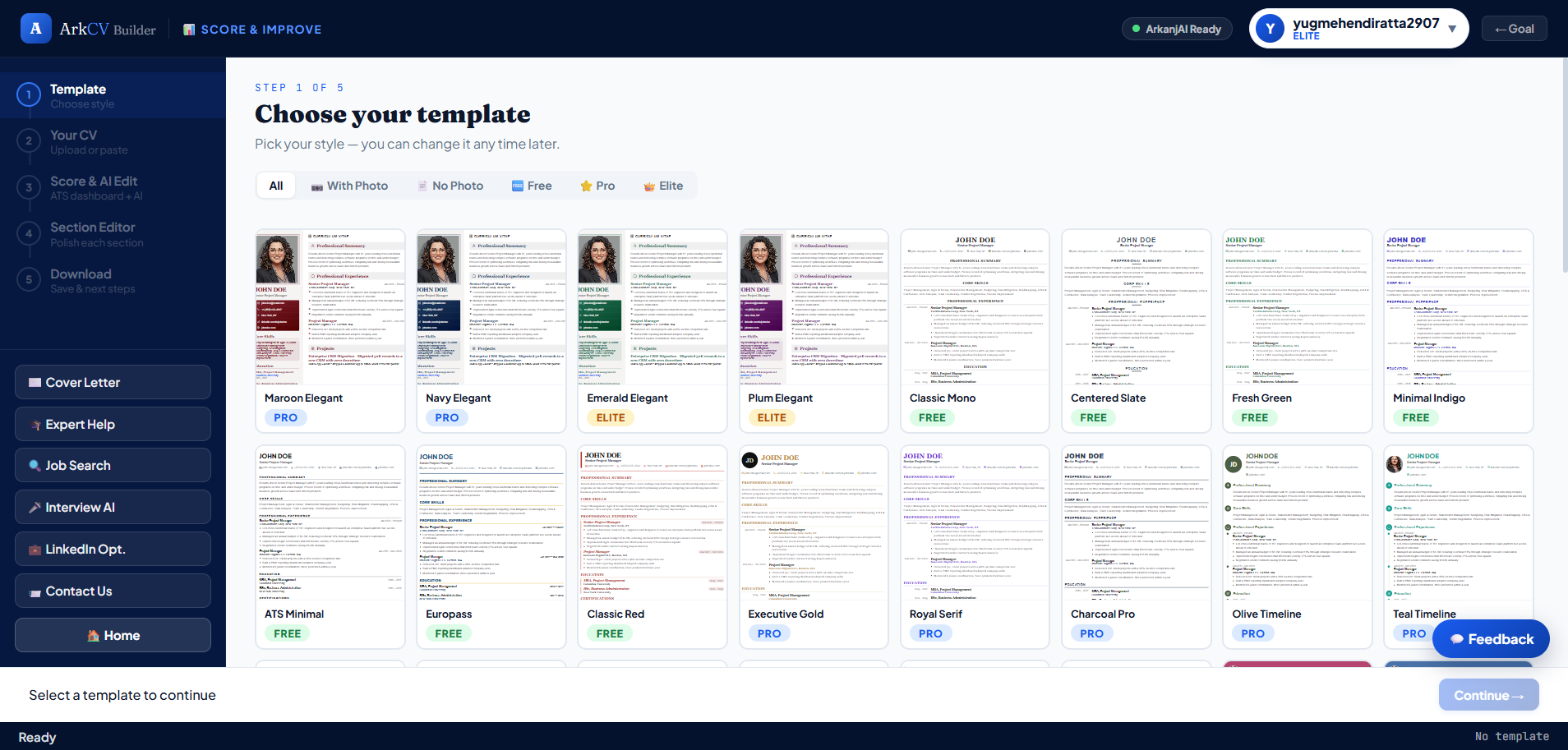
Choose a layout
Choose a layout
STEP 02
Add your resume
Upload or paste text
STEP 03
Understand your score
Six resume checks
STEP 04
Edit sections
Edit individual details
STEP 05
Preview & save
PDF and next steps
STEP 01
Choose a layout
Choose a layout
STEP 02
Add your resume
Upload or paste text
STEP 03
Understand your score
Six resume checks
STEP 04
Edit sections
Edit individual details
STEP 05
Preview & save
PDF and next steps
* These five steps follow the recorded walkthrough. Other starting options appear in version 3; their exact steps and shortcuts haven’t been checked.
04 / KEY DESIGN DECISIONS

Intentional Design Decisions.

Every design choice followed a structured framework: Problem → Design decision → Why it mattered.

DECISION 01

Transform opaque scores into six clear diagnostic checks

Problem

A single number tells candidates their resume needs work without explaining why or what to fix.

Design Decision

Grouped feedback into six clear categories: Keywords, Impact & Metrics, Contact Details, Section Structure, Action Verbs, and Formatting.

Why It Mattered

Candidates can see exactly where points were lost and know what to change first.

DECISION 02

Offer three levels of AI help to protect the user's voice

Problem

Rewriting a whole resume with AI often sounds robotic, but writing everything from scratch is slow and tiring.

Design Decision

Provided three distinct options: Section-by-Section guidance, full AI Auto-Rewrite, and an Executive Rewrite for leadership roles.

Why It Mattered

Candidates choose how much help they want—using AI suggestions while keeping control of their own words.

DECISION 03

Add a review step before downloading

Problem

AI rewrites and form edits can accidentally change dates, job titles, or formatting without being noticed in separate fields.

Design Decision

Added a 'Compile & Preview' step before users download their PDF or save their profile.

Why It Mattered

Gives job seekers a final chance to review the complete layout, check details, and catch mistakes before sending applications.

SUPPORTING CONTEXT

Balancing platform scope with core builder quality

Context

Job search workflows often include cover letters, interview prep, and LinkedIn profiles.

Product Approach

Surfaced these extra tools on dashboard and post-export screens without cluttering the primary resume builder.

Team Balance

Kept our main focus on building a great resume editor while keeping the overall scope manageable for a small team.

ArkCV / DESIGN SYSTEM

Design System
Foundations.

Unified typography, color palette, and interaction tokens.

Read the design guide
01 / THE IDENTITYOriginal ArkCV Builder logo with a luminous cyan symbol and wordmark
ArkCV Builder Original brand artwork ↗
02 / PRODUCT TYPOGRAPHYPlus Jakarta Sans

ABCDEFGHIJKLMNOPQRSTUVWXYZ
abcdefghijklmnopqrstuvwxyz
0123456789

XS / 11px

Clarity at every step.

SM / 12px

Clarity at every step.

MD / 13px

Clarity at every step.

LG / 16px

Clarity at every step.

03 / COLOURS

Accessible Surfaces & Contrast

High-contrast text tokens paired with neutral surface layers.

Supporting text#0F172Acolor.text.secondary
Less important text#334155color.text.tertiary
Alternate text#0C1830color.text.inverse
Black background#000000color.surface.muted
Card background#F1F5F9color.surface.raised
Light background#F8FAFCcolor.surface.strong
Main text#FFFFFFcolor.text.primary
04 / CORNERS

Radius Tokens

XS / 6px
SM / 8px
MD / 12px
LG / 999px
05 / SPACING

Spacing Scale

3pxspace.1
5pxspace.2
6pxspace.3
7pxspace.4
8pxspace.5
10pxspace.6
11pxspace.7
12pxspace.8
06 / ANIMATION & SHADOWS

Motion & Elevation

150msInstant
180msFast
200msNormal
010203
ACCESSIBILITY COMMITMENT

Designed with high text contrast, visible focus rings, and full keyboard navigation in mind across all interactive elements.

05.1 / CHOOSE & ADD

Flexible Entry Pathways.

Select a template structure, then import existing resume content.

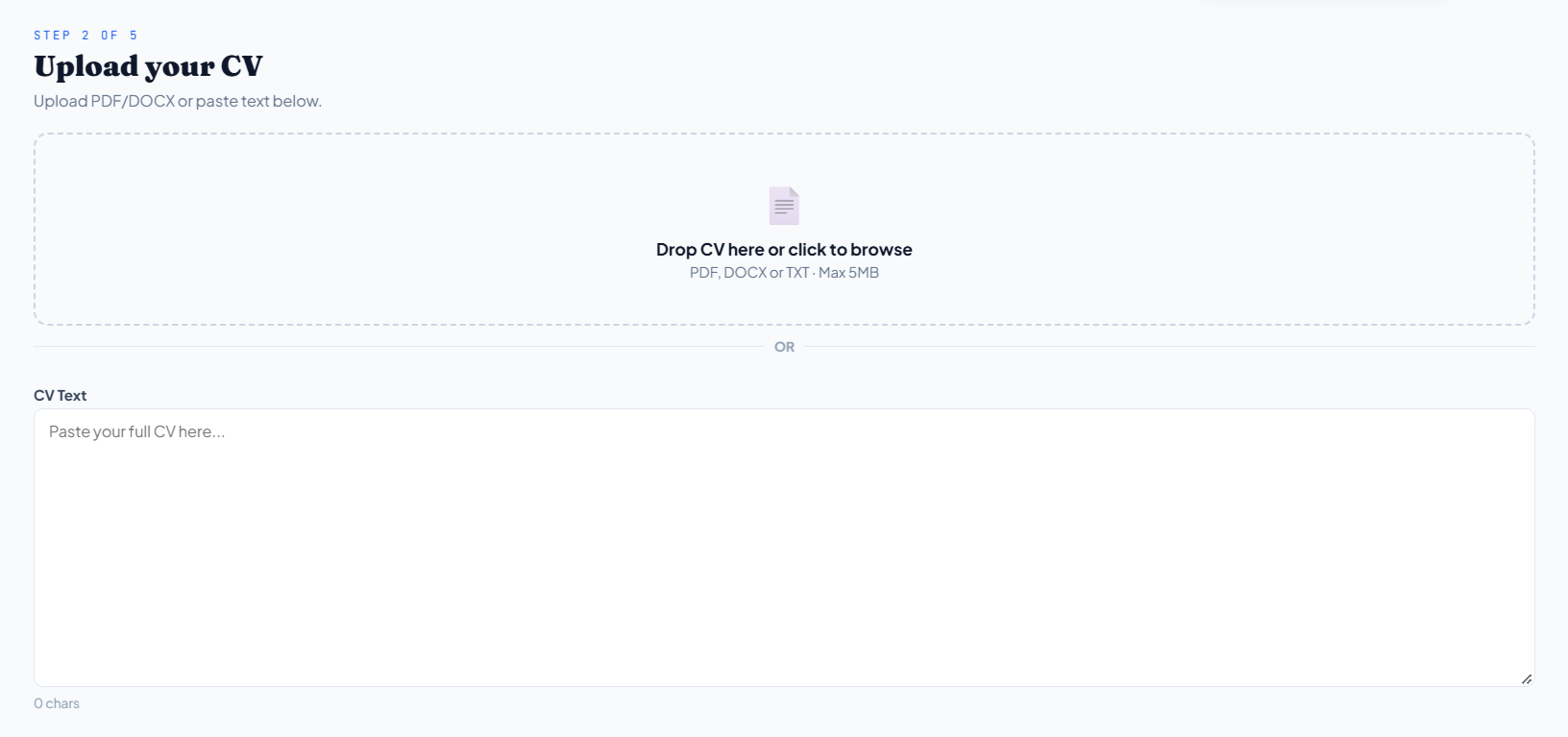
UPLOAD OR PASTE

Structured Document Ingestion

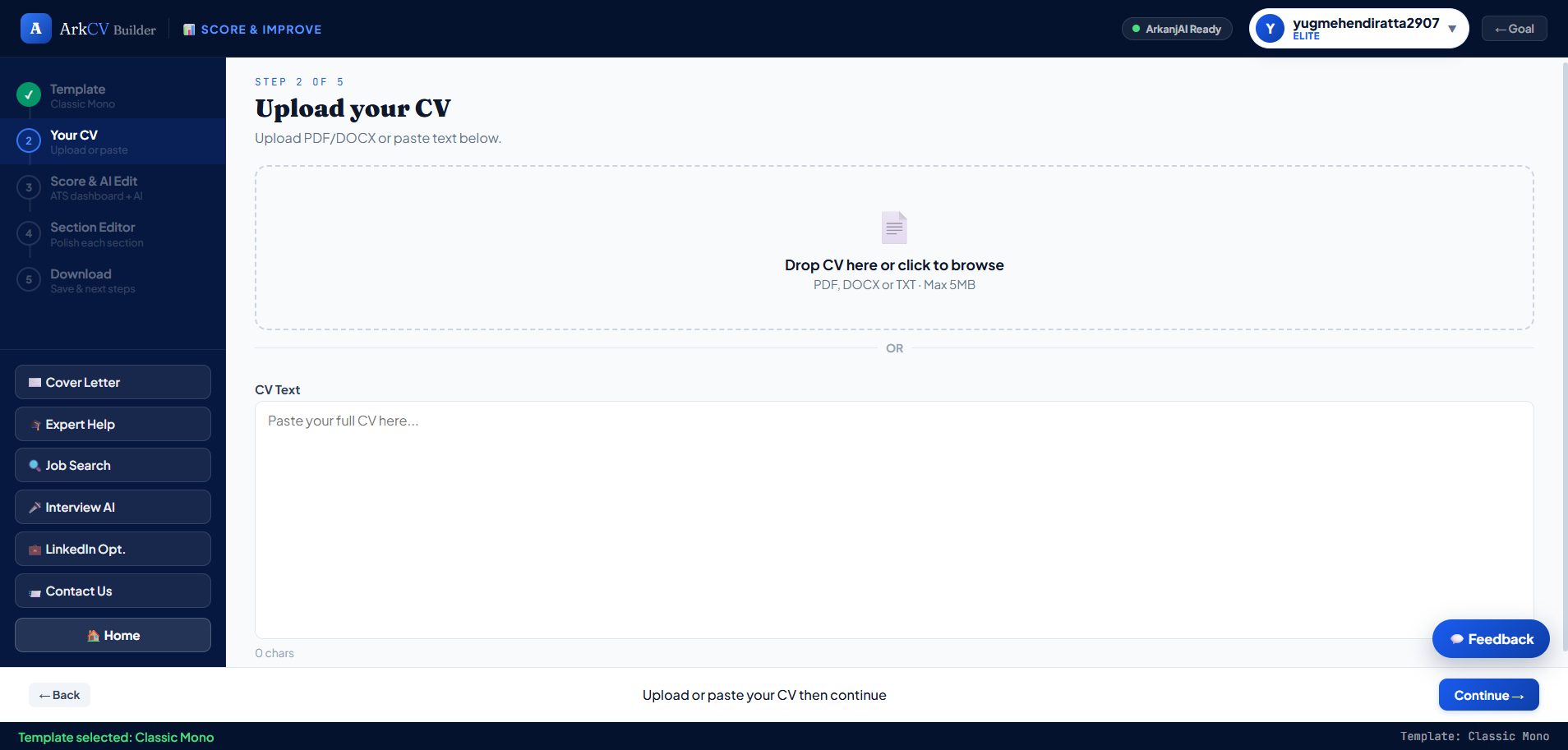
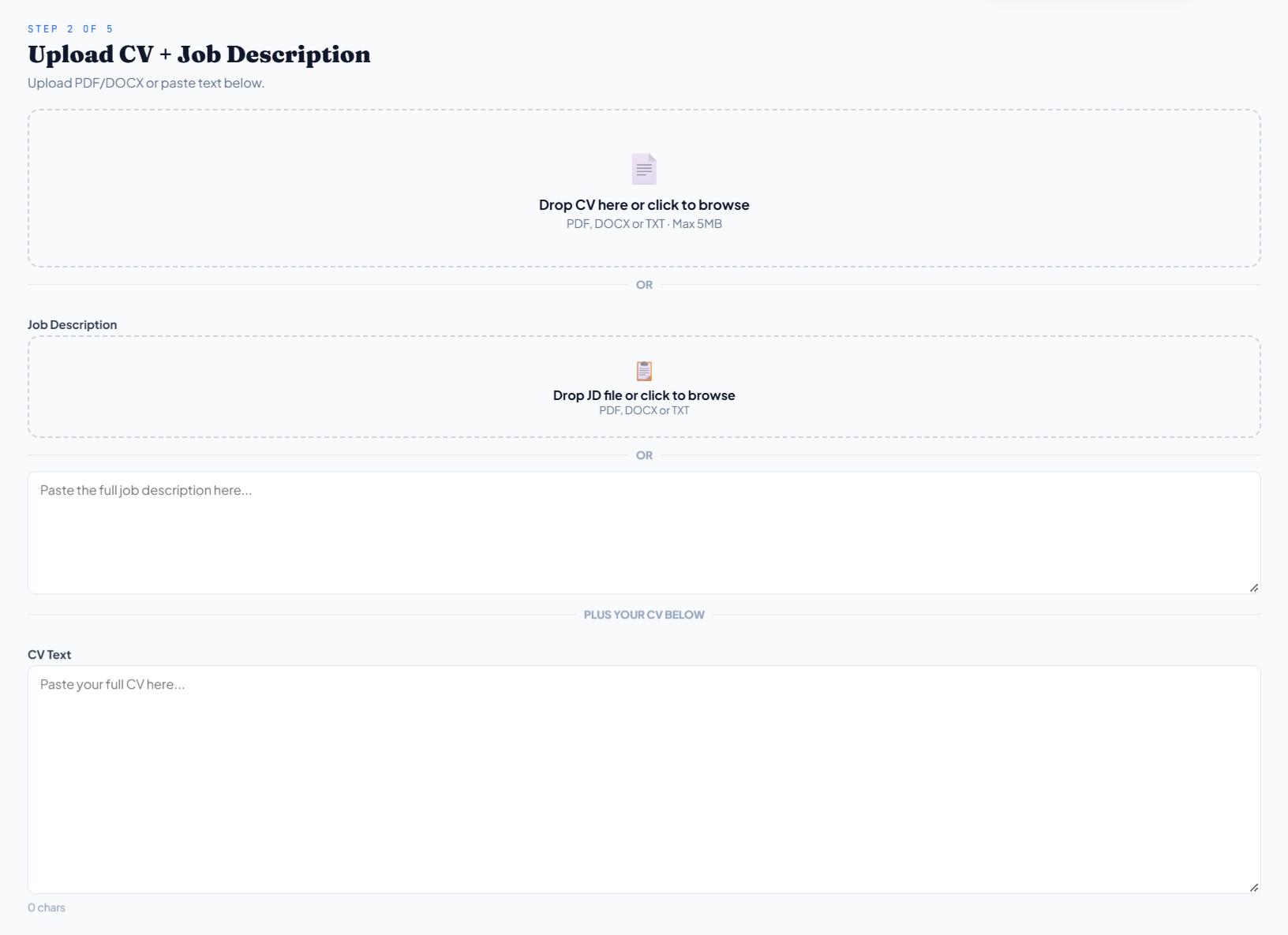
Upload a PDF or paste plain text; ArkCV parses the data directly into structured fields.

Document upload and CV text input
Document ingestion · Parse PDF or paste unformatted text
A SPECIFIC ROLE

Tailor your resume
to the role.

Resume + Job Description Comparison
Match your resume to a job
05.2 / UNDERSTAND THE SCORE

The number is
the beginning.

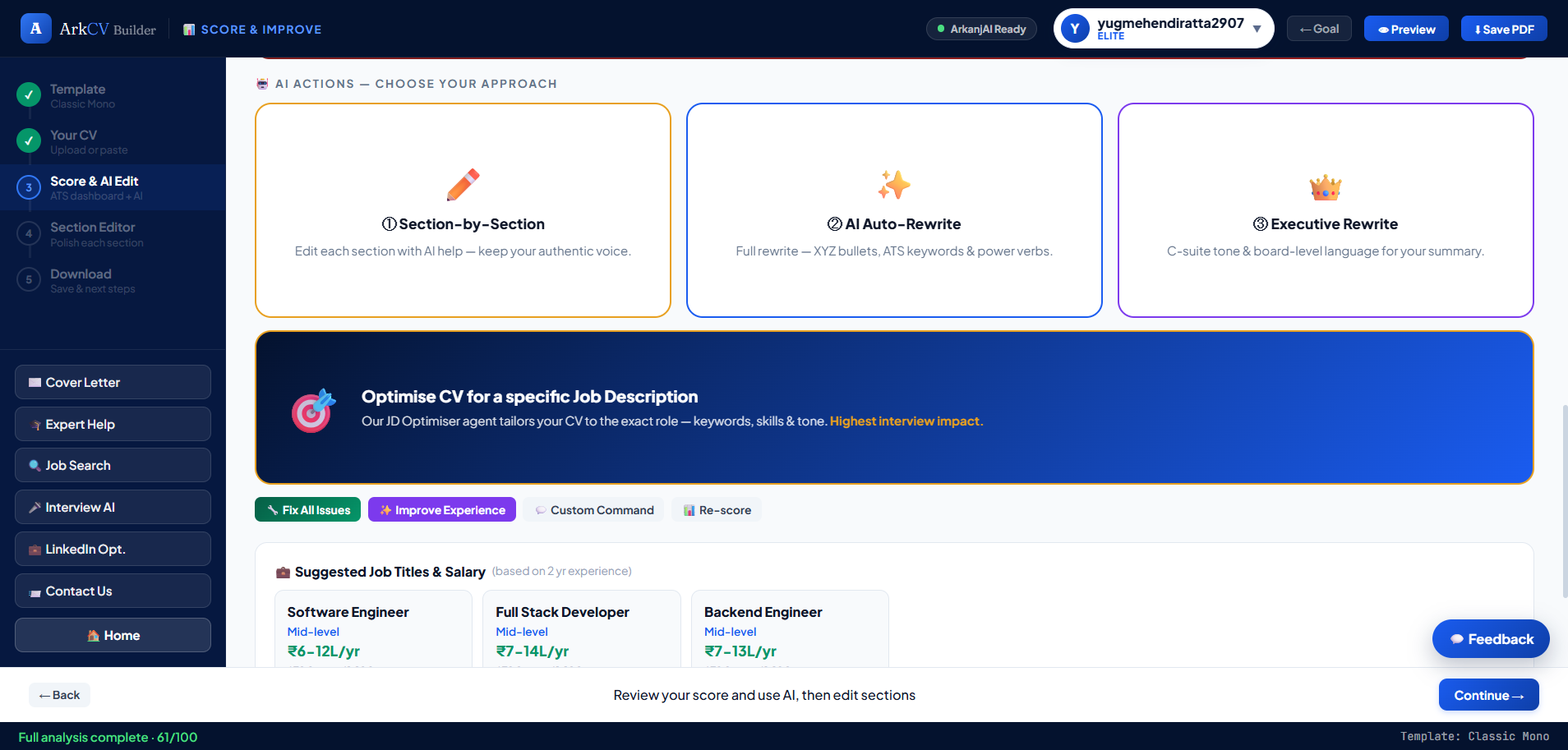
Six transparent checks diagnose where content needs refinement: role keywords, quantifiable impact, contact completeness, section hierarchy, action verbs, and formatting.

Resume checks with suggestions for what to improve
Version 3 · Six transparent diagnostic checks
THE DESIGN PRINCIPLE

Transparent diagnostics.
Candidate in control.

Understand the gaps;
choose how to resolve them.

Candidate-Controlled
AI Assistance

Select an AI assistance mode below to inspect its scope and application.

Captured V3 Section-by-Section choice
Section-by-Section · Version 3 assistance mode

Target specific sections sequentially. Apply AI suggestions while preserving personal voice and control.

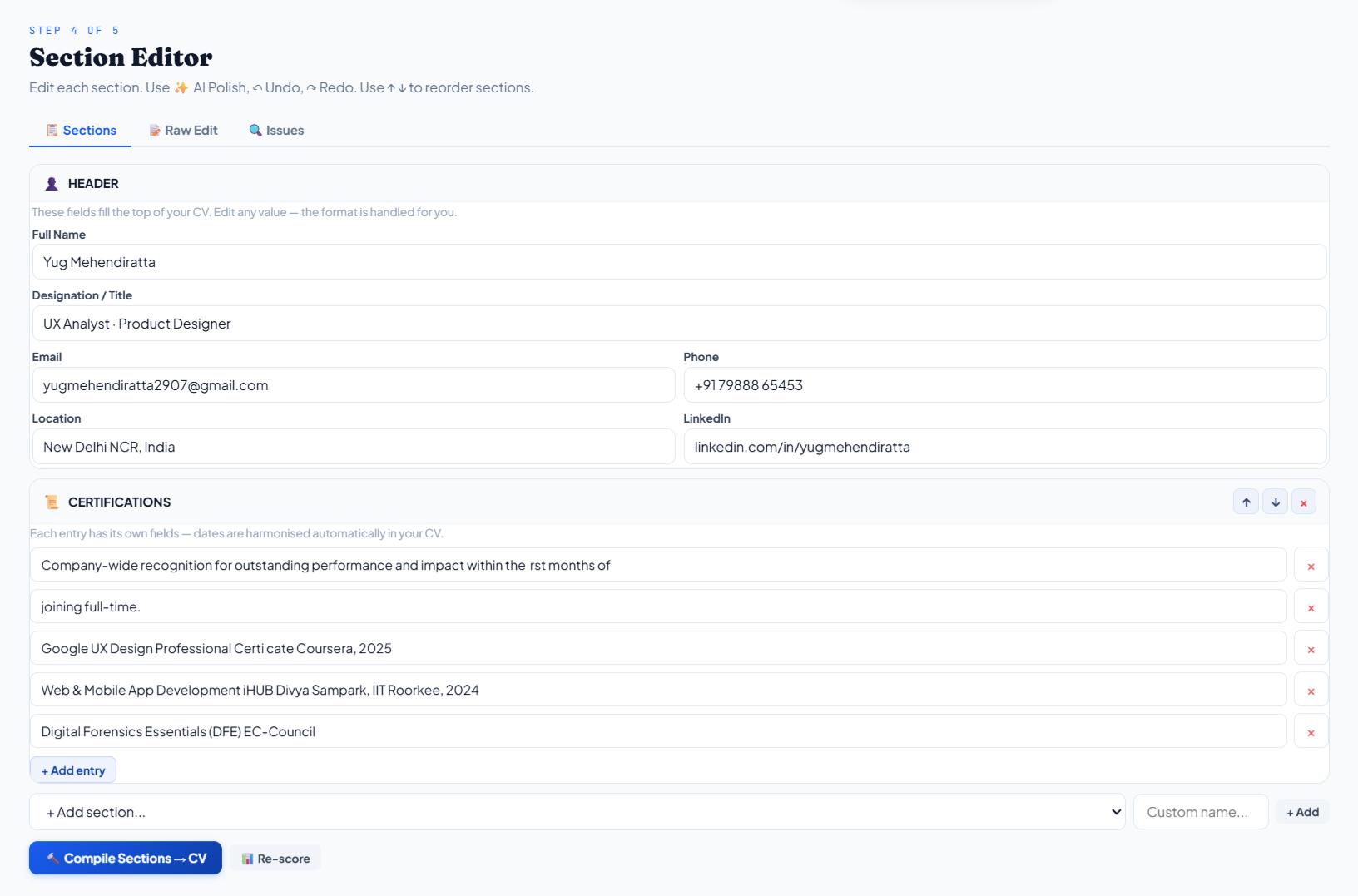
Resume editor with fields, section controls and the Compile Sections button
Resume editor · Edit fields, reorder sections, and trigger in-editor preview
05.3 / MAKE IMPROVEMENTS

The final word
is still yours.

Refine content, reorder sections, and accept only the AI recommendations that fit your experience.

Review Before Downloading

Generate a full preview to check formatting and catch mistakes before exporting.

FINAL STEP

Review Before Downloading

Check layout alignment, text styling, and details before creating your final PDF.

Your resume is finalized.
Take the next step.

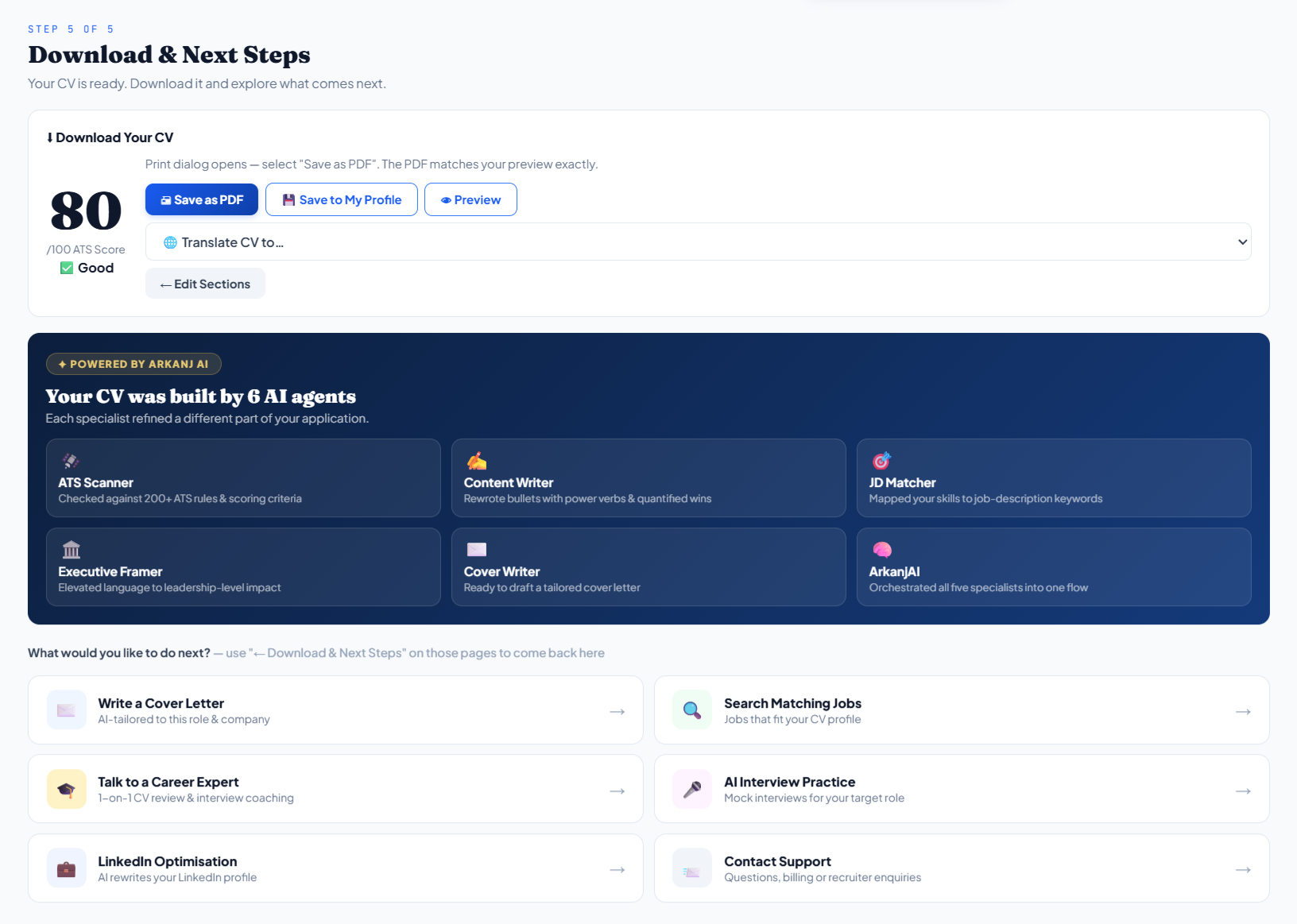
Export an ATS-compliant PDF, save the version to your profile, or explore supporting career tools.

Download and Next Steps, with PDF export, profile save, translation, and career tools
Finalization · PDF export, profile save, translation, and career tools
LIVE APPLICATION EMBED

Explore the Actual Product

Explore ArkCV’s live resume builder. Try the template filters and builder steps below, or open the application in a new tab.

arkcv.arkanj.tech/builder?mode=ats
Live application · arkcv.arkanj.techLaunch full application ↗
BEYOND THE RESUME

More than just a resume

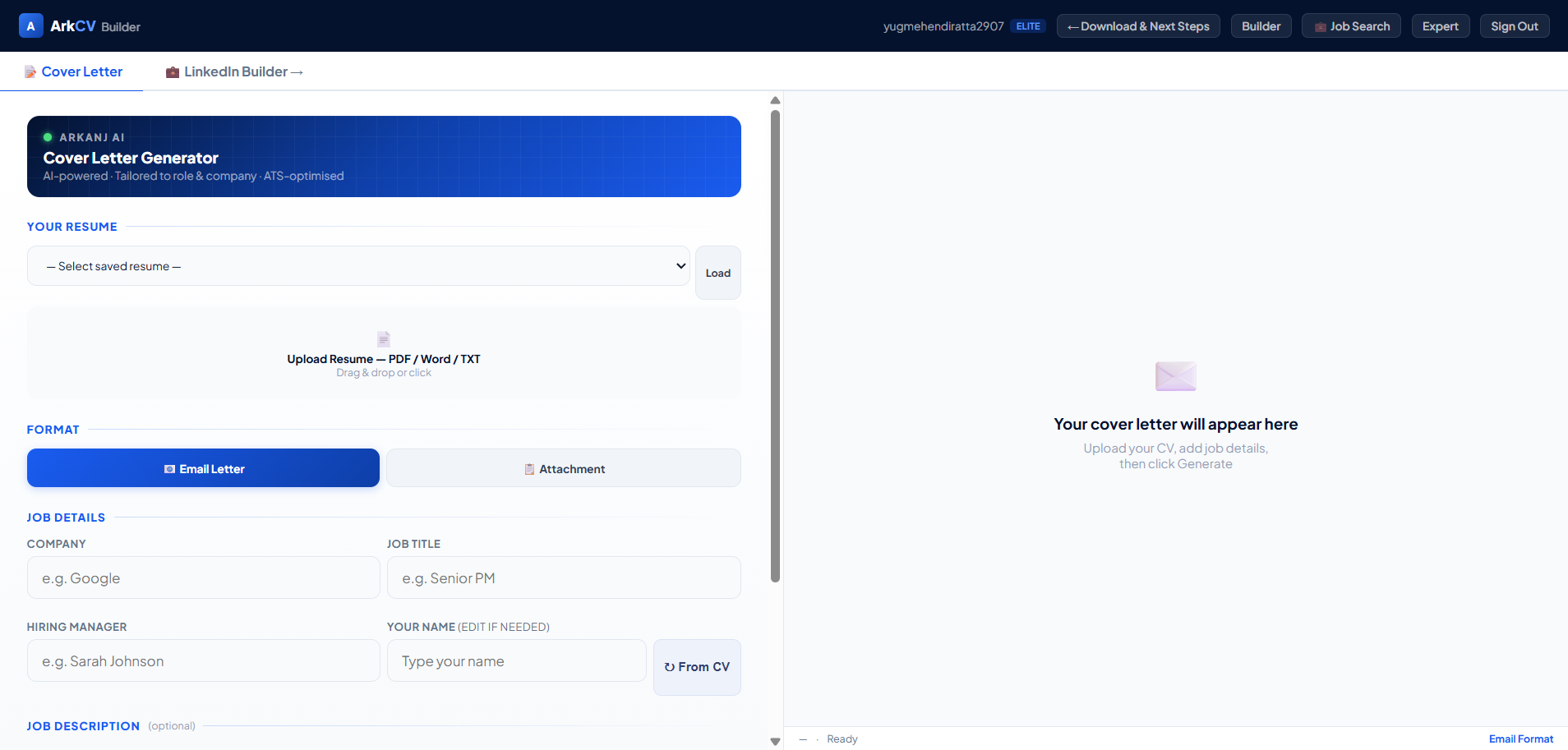
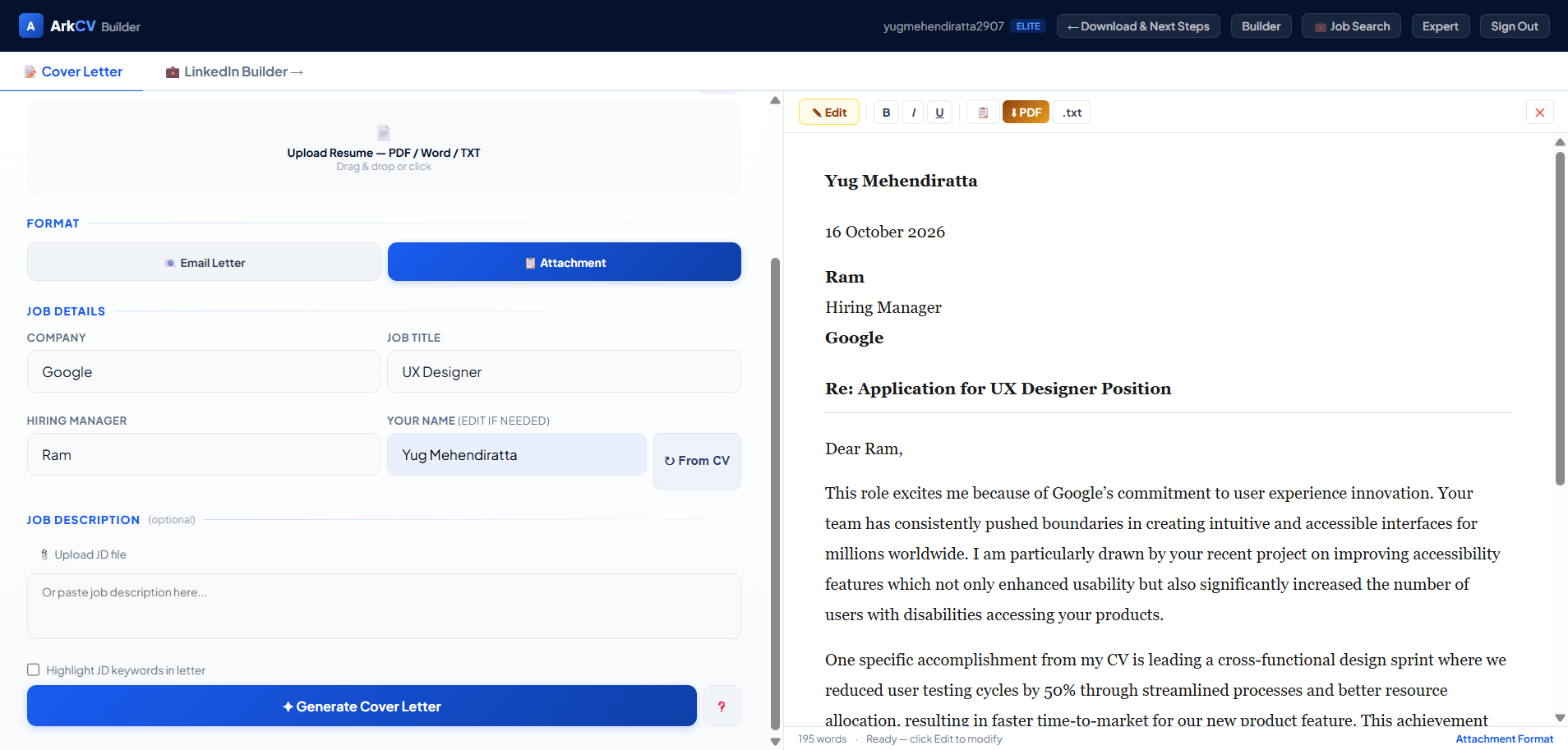
Start a cover letter
Your completed cover letter
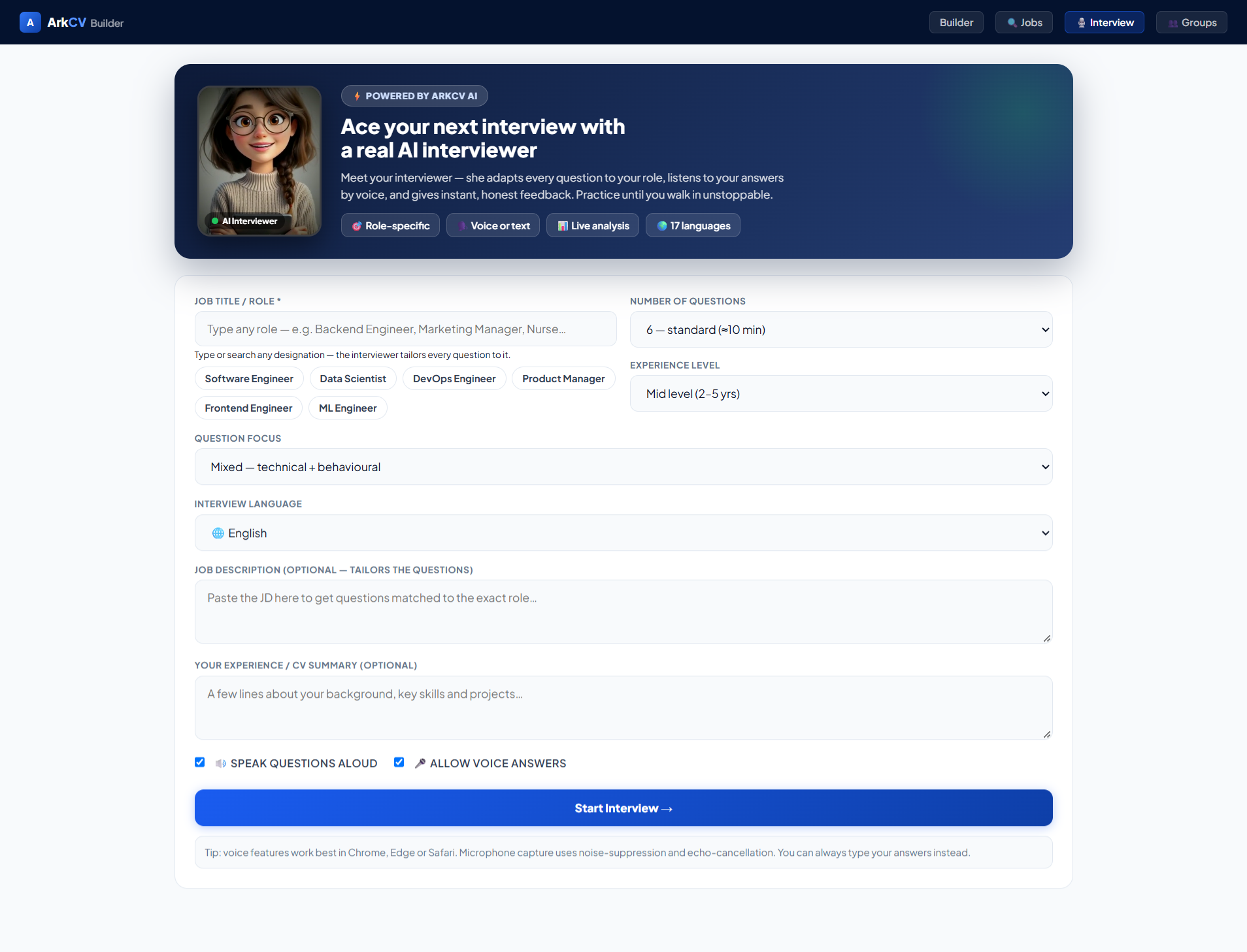
Practice an interview
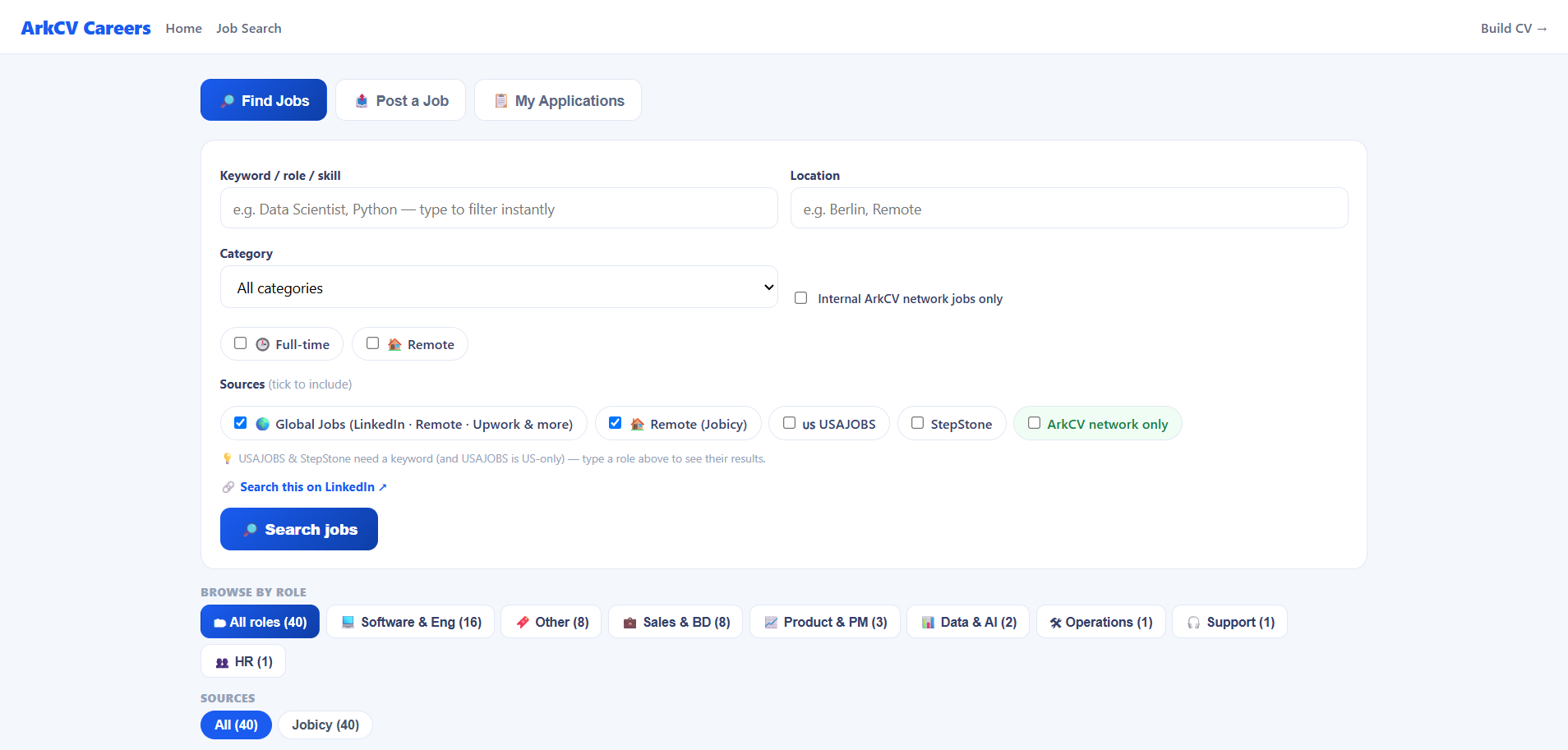
Find jobs
Find jobs
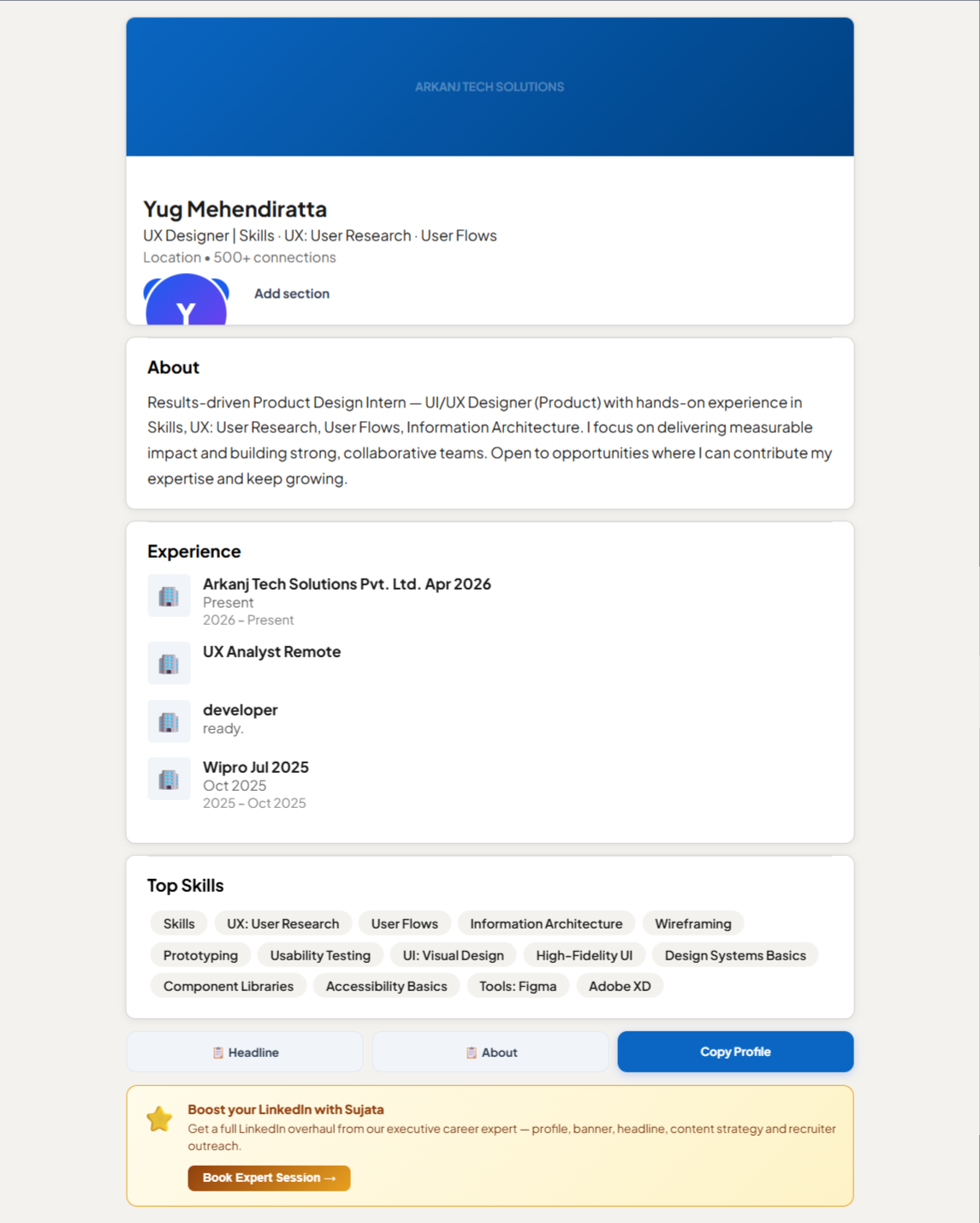
LinkedIn profile builder
ArkCV home page
ArkCV home page
06 / OUTCOMES & LEARNINGS

Release Outcomes & Candid Reflections.

Version 3 delivered a more transparent, user-controlled resume builder. Here is what we shipped, what we reviewed together, and what still needs testing.

What Version 3 Shipped
Version 3 delivered the six diagnostic checks on the score dashboard, three AI rewrite options, and the pre-download review before exporting a PDF.
What We Reviewed Internally
Walkthroughs across our three-person team and informal peer reviews on working browser builds helped us spot confusing labels, navigation hiccups, and layout awkwardness before release.
Honest Limitations & Next Steps
Testing with broader groups across different industries, completion rates, and real-world hiring results have not been measured yet. Next steps include testing with more job seekers, tracking drop-offs in the builder, and running accessibility checks for keyboard navigation and contrast.
ArkCV / PRODUCT CASE STUDY / APRIL—JULY 2026

Let's Talk

I'm most energized by projects where I can dig into complex problems, collaborate with smart people, and ship things that genuinely improve someone's day.

Comment

Yug Mehendiratta - Product Designer & UX Analyst avatar

Yug

Open to contract work, full-time roles, and interesting conversations about hard design problems.

1